


CleanNow
4.713.00 Reviews
App Specs
- Version
- 1.0.7
- Updated On
- License
- Free
- Downloads
- 100,000+
- Developer
- Sudhakar Chippa
- Categories
- Tools
- Platform
- Android
Screenshots
 Analysis by AppCompare
Running out of space is one of those phone problems that becomes urgent at the worst possible time. A camera refuses to save a photo, an update cannot finish, or an app starts behaving strangely because the storage bar has quietly reached its limit. CleanNow is a free Android tools app from Sudhakar Chippa that takes a focused approach to that problem: it helps identify clutter, brings attention to large files and screenshots, and makes installed apps easier to manage.
I like that its purpose is immediately practical. This is not an all-purpose file manager pretending to be a complete maintenance suite. Its appeal is narrower and, for many people, more useful: open it when the phone feels crowded, inspect what is taking room, and decide what can safely go. The app has reached over one hundred thousand installs and holds a 4.7 average from more than five hundred ratings, which suggests that its straightforward approach has connected with a meaningful number of Android users.
How CleanNow feels when you need quick storage relief
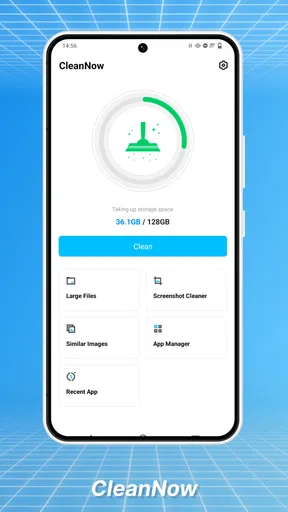
The first thing I look for in a storage tool is whether it reduces decision-making or adds another layer of it. CleanNow is built around recognizable problem areas rather than an intimidating technical dashboard. Large files, screenshots, and installed apps are the kinds of things I can understand at a glance, even when I am in a hurry.
That makes the app especially suitable for a quick pre-trip cleanup. Before downloading offline maps, recording a long video, or installing a large game, I would rather review a short list of obvious candidates than browse through folders one by one. Screenshots are often the best example: they accumulate quietly, are easy to recognize, and are usually less emotionally important than personal photos or documents.
The useful speed advantage is not just opening the app quickly; it is reaching a sensible cleanup decision with fewer steps. A tool can scan rapidly and still waste time if it forces me to interpret confusing categories. CleanNow’s narrow focus gives it a practical advantage over a traditional file manager for this particular job.
There is an important expectation to set, though. A storage organizer cannot create free space without asking me to remove something or manage an app. The benefit is visibility and control, not magic. If the phone is full of genuinely important videos, work files, or downloaded media, the app can help me find them, but it cannot decide their value for me.
What I would clean first
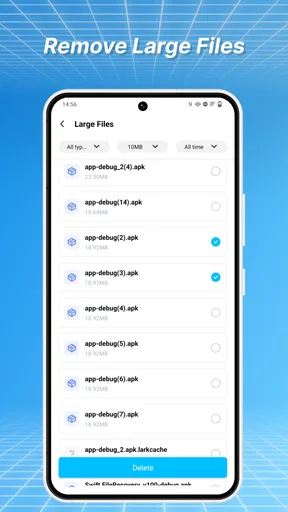
My preferred workflow starts with large files, because a single oversized recording can matter more than dozens of tiny downloads. I would inspect the file name and context before deleting anything, especially if the phone is used for work or family media. A large file is not automatically disposable; it is simply a good place to begin an informed review.
Worth Reading Before You Choose

EA SPORTS FC Mobile 26 Is a Bigger Football Game, but It Takes Time

Flipboard Shows What News Apps Must Do Beyond the Feed

Switching to Android Auto Means Rethinking Your Driving Routine

Google Calendar Makes a Crowded Week Easier to Manage

Ludo King Makes the Most of the Minutes Between Plans

Baby Panda World Brings Quick Play to Modern Phones, but Its Game Library Feels Busy
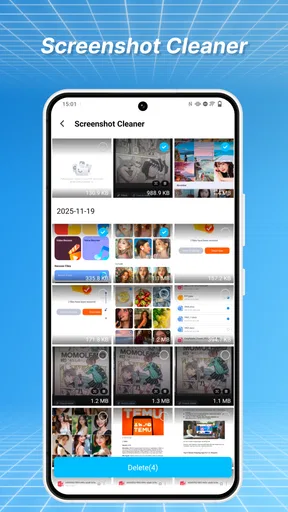
Next, I would check screenshots. This is where CleanNow can save more time than a general gallery browse. Screenshots often include temporary information such as delivery details, appointment instructions, product comparisons, or messages I meant to revisit. I would keep anything still needed, then remove the rest in one deliberate pass rather than deleting images randomly.
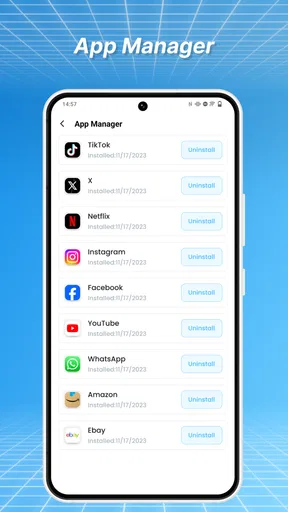
App management is useful for a different reason. Unused apps are easy to forget because they remain out of sight after installation. Reviewing them during a cleanup can reveal games, shopping apps, or one-time utilities that no longer justify their space. The trade-off is that uninstalling an app may also remove locally stored data, so I would check whether an app contains drafts, downloads, or offline content before confirming.
A small but valuable habit is to separate “temporary” from “important” before touching the cleanup controls. I would not treat every screenshot as junk, every large file as disposable, or every old app as safe to remove. CleanNow helps surface candidates; the quality of the result still depends on the reviewer's attention.
What happens during a heavy cleanup session
The most demanding moment is not ordinary browsing. It is the first serious cleanup after months of neglect, when the phone may contain a large mixture of screenshots, recordings, downloads, and forgotten applications. That is when I would judge the experience by clarity and stability more than by a promise of instant results.
For a heavy session, I would work in stages instead of trying to remove everything at once. Large files first can produce the most noticeable change. Screenshots can follow because they are comparatively easy to recognize. App management should come last, when I have already recovered enough room to avoid rushing through decisions.
This staged approach also gives me a recovery point. If I discover that a deleted item mattered, I know which category I was working through and can stop before making more changes. It is a better habit than tapping through every suggested item in a single burst.
CleanNow’s design is best suited to this kind of guided maintenance rather than constant background intervention. I would open it when storage becomes a concern, not expect it to monitor every byte continuously. That distinction matters for people who want an always-on optimizer. The app’s value is in an intentional cleanup session, where I remain in control.
On a phone shared with children or family members, I would also avoid treating the app as a substitute for supervision. A child’s game may look unused to one person but contain saved progress that matters to another. Before removing an app, I would ask who uses it and whether its data is synchronized elsewhere. CleanNow can make the candidate list easier to inspect, but it cannot know the personal meaning of each item.
Stability and the importance of cautious decisions
A storage tool earns trust by making its actions understandable. In my view, the strongest part of CleanNow’s concept is that its targets are familiar: files, screenshots, and apps. That is easier to reason about than vague claims about hidden junk or mysterious performance problems.
I would still use a cautious rhythm. Review a category, select only what I recognize, complete the action, and then check the phone’s available space before moving on. If the phone suddenly behaves differently after an app removal, the staged process makes it easier to identify what changed.
Recovery is an area where users should keep their own safeguards. I would not assume that a cleanup action can be undone inside the tool. Important photos and documents should already exist somewhere safe before I begin. For screenshots, I would preserve anything containing travel details, receipts, addresses, or instructions until I am certain it is no longer needed.
This is also why I prefer CleanNow for visible clutter rather than sensitive housekeeping. If I am trying to manage private documents, work folders, or complicated backups, a dedicated file-management or cloud-storage workflow may be more appropriate. CleanNow’s strength is reducing everyday storage clutter, not replacing a complete backup strategy.
Device limits and who should use it
CleanNow supports Android 8.0 and newer, so its audience includes people using older compatible phones as well as recent devices. That matters because storage pressure is often felt most sharply on phones with modest capacity. A focused cleanup tool can be more valuable there than on a new device with abundant free space.
At the same time, older hardware can make every maintenance task feel more noticeable. I would keep expectations realistic: the app may help organize the cleanup process, but it cannot turn an aging phone into a faster model or compensate for a worn-out battery. If the real problem is slow hardware, unstable software, or a failing storage component, deleting screenshots will only address one symptom.
Resource demands are best considered in context. A tool that is opened for occasional scans has a different role from an app that constantly runs in the background. I would use CleanNow as an on-demand utility and close the task when finished, particularly on a device where battery life and memory are already tight.
People who want a simple way to review large files and screenshots should find the concept approachable. It is also a good fit for someone who dislikes navigating Android’s file system manually. On the other hand, advanced users who need detailed folder operations, duplicate-file analysis, cloud transfers, archival workflows, or fine-grained storage reporting may prefer a full file manager or the phone maker’s built-in storage screen.
That comparison is important. Android’s own settings are often enough for viewing broad storage categories and uninstalling applications. A gallery app may be better for sorting personal images, while a file manager can provide deeper control over folders and extensions. CleanNow makes sense when I want a more focused cleanup path around the types of clutter people commonly overlook, not when I need every storage operation in one place.
Everyday scenario: preparing for a long recording day
Imagine I am leaving for a day of filming and discover that the phone has little room left. I would open CleanNow before deleting anything, inspect the largest files, and look for old recordings that have already been copied elsewhere. Then I would review screenshots, removing expired tickets, temporary reference images, and duplicate instructions while keeping anything still relevant.
After that, I would examine installed apps. A rarely used game or shopping app might be a reasonable candidate, but I would check whether it stores offline content or unsynchronized drafts. Only once those decisions were complete would I start recording. This workflow is safer than deleting random gallery items because it prioritizes obvious storage wins and leaves personal memories for a more careful review.
If I still lacked room, that would tell me something useful: the issue may be important media rather than casual clutter. At that point, transferring files to a computer or trusted cloud service would be the better solution. CleanNow helps me reach that conclusion faster, because it separates easy cleanup opportunities from files that require a real storage decision.
Version, cost, and the overall experience
The current version is 1.0.7, and the app is free to use. That combination makes it easy to try without turning storage cleanup into a financial commitment. The Everyone age rating also makes its presentation broadly accessible, although I would still supervise cleanup on a shared family phone because the consequences of removing the wrong file are personal rather than technical.
My main reservation is not about the idea itself but about the limits of a focused tool. CleanNow can make common clutter easier to find, yet it cannot replace careful file judgment, backups, or a broader diagnostic utility. Someone expecting a complete phone optimizer may find the experience narrower than expected. I see that narrowness as acceptable if the goal is clear, but it should be understood before installing.
I would also avoid judging the app by whether it makes a phone feel instantly faster. Recovering storage can help when the device is cramped, but speed problems have many causes. A phone with too many background processes, old hardware, or software issues may remain slow after a successful cleanup. CleanNow is most convincing when measured by how quickly it helps me understand and reduce storage pressure.
My performance verdict
After looking at the way this app is positioned, I would recommend CleanNow to Android users who want a direct, low-friction storage review centered on large files, screenshots, and installed apps. Its strongest quality is focus. Instead of asking me to become a file-system expert, it points my attention toward clutter categories that are easy to recognize and often worth checking.
I would use it before travel, before a major recording session, after downloading too much media, or whenever the storage warning appears. I would not use it as my only backup method, nor would I choose it over a full file manager for complex folder work. Those are not failures; they are boundaries that keep the app’s purpose clear.
For a free tools app from Sudhakar Chippa, CleanNow offers a sensible answer to a common Android annoyance. The experience is most effective when I treat it as a careful inspection assistant rather than an automatic delete button. If you want a focused way to reclaim space without wandering through the entire phone, CleanNow is worth trying; if you need deep file control or guaranteed recovery, choose a more specialized alternative.
In everyday use, that balance is what makes CleanNow appealing. It can shorten the path from “my phone is full” to “I know what is taking the space,” while leaving the final decisions in my hands. That is the right level of help for routine cleanup, provided I slow down around personal files and keep important data backed up.
Pros
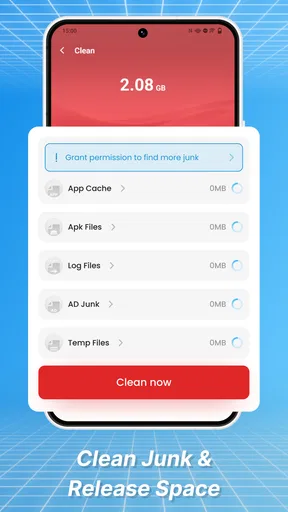
- Quickly removes junk files and temporary data.
- Simple interface that is easy for first-time users.
- Storage analysis helps identify large files.
- Can improve available space without manual sorting.
- Useful cleaning reminders encourage regular maintenance.
Cons
- Some features may require a paid subscription.
- Cleaning results can vary depending on device and Android version.
- Aggressive cleanup may remove files you intended to keep.
- Background scans may use battery and system resources.
- iOS functionality may be more limited than on Android.
FAQs for CleanNow
What is CleanNow, and what can I use it for?
CleanNow is a cleaning and optimization app designed to help users manage unnecessary files, cached data, duplicate items, and other storage-consuming content on a mobile device. After scanning your phone, it generally presents recommendations for freeing space and improving organization. Its usefulness depends on the device and operating system, so reviewing each suggested item before deletion is important.
Is CleanNow safe to use on my Android or iPhone?
CleanNow can be useful when downloaded from an official app store and granted only the permissions it genuinely needs. However, no cleaning application should be trusted blindly. Before approving a cleanup, check the files selected for removal, read the privacy policy, and avoid granting access that seems unrelated to the app’s purpose. Availability and permissions may differ between Android and iOS.
Can CleanNow improve my phone’s performance?
CleanNow may help performance indirectly by removing temporary files, clearing unnecessary downloads, or freeing storage space. This can make a device feel less cluttered, especially when storage is nearly full. It is not a guaranteed speed booster, however, and it cannot fix hardware limitations, battery degradation, operating-system problems, or apps that are poorly optimized.
Will CleanNow delete my photos, videos, or important files?
CleanNow should normally identify removable items and provide a confirmation step, but users should still inspect the results carefully before starting a cleanup. Similar photos, large videos, downloads, and duplicate files can sometimes be selected even when you want to keep them. Create a backup of valuable content and use the preview or review options whenever they are available.
Does CleanNow require a subscription or contain advertisements?
The exact pricing model for CleanNow can vary by platform, version, and region. Some features may be available for free while advanced tools, unlimited scans, or automatic cleanup options may require advertising support or a premium subscription. Check the app-store listing and the in-app purchase screen before accepting a trial, and confirm cancellation terms to avoid unexpected recurring charges.


